How to Organize a Parent's Medical Records
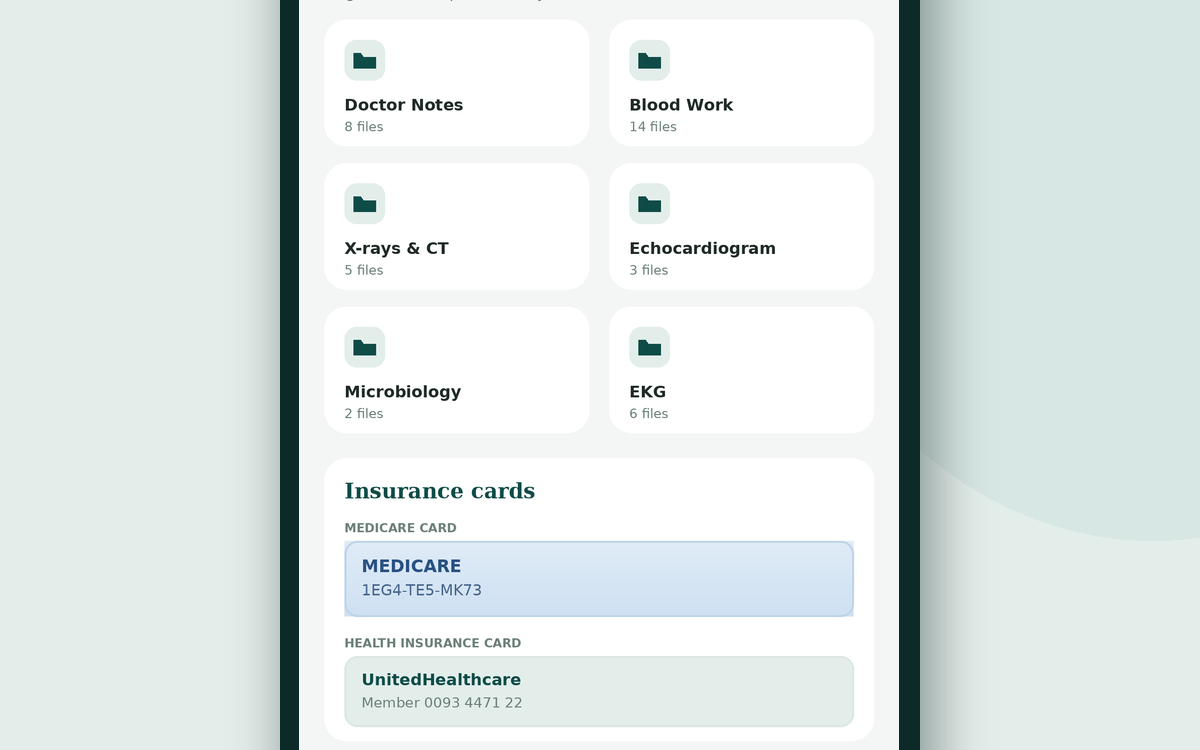
Medical paperwork accumulates in the places it lands — a folder in the car, a pile on the counter, a drawer that no longer closes. It works until the moment someone asks “do you have the results from the cardiologist?” and you're standing in a waiting room turning pages.
You don't need a filing cabinet or a scanner. You need six categories, one place to put things, and about ninety minutes on a Saturday.
Why it's worth the afternoon
Organized records pay off at exactly the moments that matter most: an ER visit where nobody knows the history, a second opinion where a new specialist needs the last scan, an insurance denial that hinges on a date, or a hospital discharge where the medication list changed and you need to see what it was before.
The six-folder system
Almost everything a family accumulates fits into six categories. Use these names — they match how doctors think and how you'll search later.
The six folders
- Doctor notes — visit summaries, after-visit instructions, specialist letters
- Blood work — lab panels and anything from a blood draw
- Imaging — X-rays, CT scans, MRIs, ultrasounds and their written reports
- Heart — echocardiograms, EKGs, stress tests, cardiology reports
- Microbiology — cultures, infection results, sensitivities
- Insurance and legal — cards, approvals, denials, power of attorney, advance directives
Paper, digital, or both?
There's no single right answer, but there is a reliable rule: the copy you have with you is the one that helps.
Photos on your phone
The lowest-effort approach that actually works. Photograph each page as you receive it and file it into the right folder. Nothing to scan, nothing to carry, and it's with you in the waiting room. This is what Caregiver Help does — folders that match the six categories above, stored on your own device with nothing uploaded to a server.
The patient portal
Excellent for recent results from one health system, and free. The limitation is that each system has its own portal, so a parent who sees doctors across two hospitals and an independent specialist ends up with three logins and no single view. Portals also tend to show results, not the paperwork you were handed.
A paper binder
Still genuinely useful, especially for a parent who wants to see their own records or for handing to a home health nurse. Keep it in the same bag you take to appointments. Its weakness is that it's only helpful where it physically is.
Many families land on photos on the phone as the working copy, plus a thin paper folder with the essentials for emergencies.
Keep all of this in one place
Caregiver Help tracks medications, vitals, appointments, and medical records on your own phone — private, with nothing uploaded to anyone.
See how it works $7.99/month or $19.99 once · works on any phone or computerWhat to keep — and what you can let go
Worth keeping
- Every visit summary and specialist letter
- Lab and imaging reports, especially anything abnormal
- The current medication list, and the one from before the last hospital stay
- Hospital discharge paperwork
- Insurance cards, approval and denial letters
- Advance directives, healthcare power of attorney, and DNR paperwork if it exists
- A one-page summary: diagnoses, surgeries with rough dates, allergies, doctors
You can generally let go of appointment reminder cards, duplicate copies, itemized bills once they're settled, and pharmacy leaflets. When in doubt about anything clinical, keep it — a photo costs nothing.
Build the one-page summary first
If you only do one thing from this article, do this. On a single page, write your parent's diagnoses, major surgeries with approximate years, allergies, current medications, doctors with phone numbers, insurance details, and emergency contacts.
That page answers about eighty percent of what any new clinician will ask, and it's what you hand over when you're too rattled to explain. Keep a photo of it on your phone and a copy in the go-bag.
Keeping it current without it becoming a project
The system fails when filing becomes a task for later. Two habits prevent that:
File in the parking lot. Photograph the paperwork before you drive away, while you still remember what it is. Ninety seconds beats an evening of sorting.
Do a ten-minute review each month. Update the medication list, check what's missing, and delete duplicates. Put it on the calendar next to the refill date.
Share access with one other person
If you were unavailable tomorrow, could someone else find the medication list? Make sure at least one other family member knows where the records live and how to get to them — a sibling, or whoever provides backup care.
The goal isn't a perfect archive. It's being able to answer the question in front of you.
Stop keeping it all in your head
Medications, vitals, appointments, records, and reminders — organized on one calm screen, made by a caregiver for caregivers.
Try Caregiver Help $7.99/month or $19.99 once · 14-day money-back guaranteeFrequently asked questions
How long should I keep an elderly parent's medical records?
Keep summaries, imaging and lab reports, discharge paperwork, and legal documents indefinitely — they establish history that matters years later. Routine bills and appointment cards can go once settled. Digital copies cost nothing to keep, so when in doubt, photograph it.
What is the best way to store medical records for a parent?
Photograph documents as you receive them and file them into consistent categories on your phone, so they're with you at appointments. Keep a thin paper folder of essentials — medication list, insurance cards, advance directives — for emergencies.
Can I get copies of my parent's medical records?
Yes, with authorization. You'll typically need a signed release or a healthcare power of attorney on file with each provider. Ask the records department what form they require; most have a standard request form and must respond within a set timeframe.
What should be in a one-page medical summary?
Diagnoses, major surgeries with approximate dates, allergies, current medications with doses, doctors and phone numbers, insurance information, and emergency contacts. Keep it on your phone and in any bag that goes to the hospital.